
Adding Custom Shortcuts to Gnome
Last Updated: Wed, Feb 18, 2009The motto with Linux is customization right? So lets customize the shortcuts in Gnome to make them do what we want them to do.
If you are looking for a list of default Gnome shortcuts check out, All the Best Linux Cheat Sheets.
First open up the gconf-editor
gconf-editor
Then in gconf go to apps > metacity > keybinding_commands
You will see commands ranging from 1-12. These are your custom command aliases. Select one that is not in use. Lets say command_1
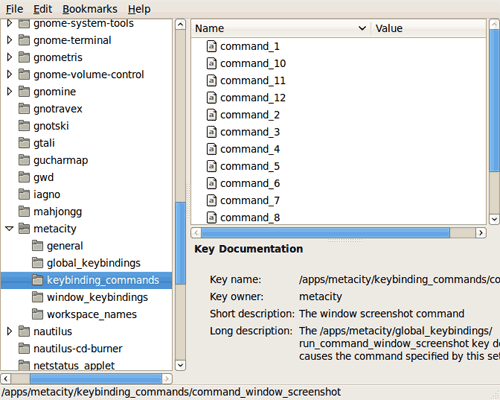
Then type in the command that you want ran.

No on the left side of gconf go to global_keybindings.
Find the corresponding runcommand and double click.
In the value you will type in your shortcut for example,

Now for this example Ctrl+Alt+s will open up the gnome-system-monitor.

Just repeat the steps to add more shortcuts. Just remember to try out the shortcut before you override it. You probably don’t want to assign a shortcut to something that is already used for something more important.
There are also some preset shortcuts you can set in System > Preferences > Keyboard Shortcuts.